Project 5

Claw machine game

AR Project ('22.02.19 ~ '22.02.21.) Claw machine app 개발 제작 순서 - 뽑기 발판 기능 제작 - 뽑기 밀판 기능 제작 - 인형 추가 - 기능 오브젝트 → 프로젝트 오브젝트 변경 - 뽑기 애니메이션 연결 - 인형뽑기 이벤트 추가 뽑기 발판 기능 제작 인형뽑기 발판 public class Plane_rotate_auto : MonoBehaviour { float speed = 40f; private void Start() { gameObject.SetActive(true); } private void Update() { gameObject.transform.Rotate(0, -this.speed * Time.deltaTime, 0); } } 발판이 되는 게임 오브젝..
Project/AR Project 2022.02.18

Window Mission

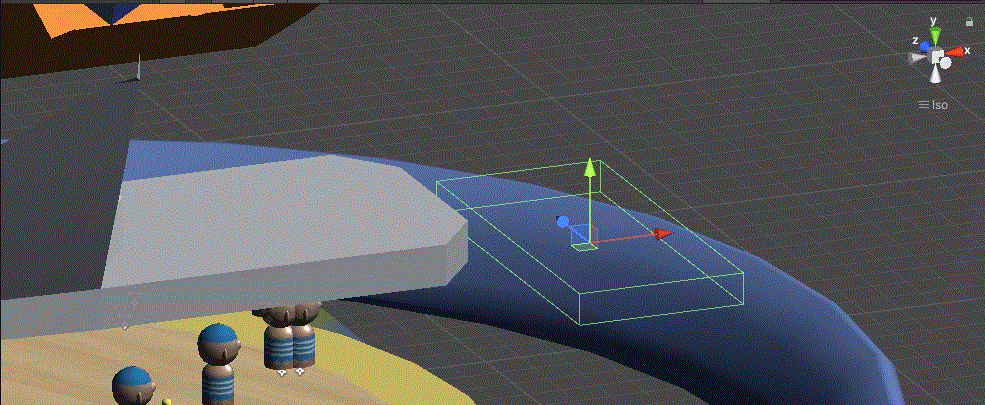
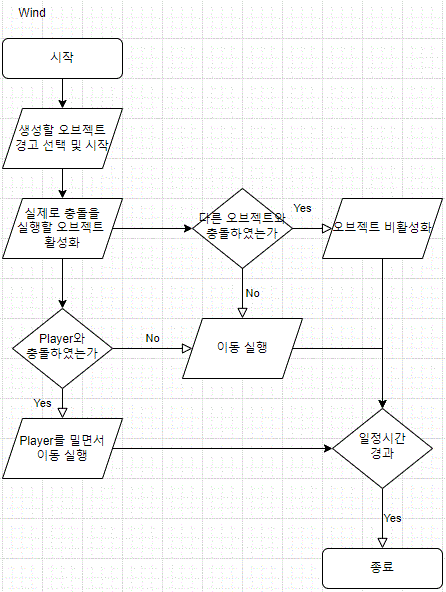
바람 오브젝트 선택 public class Select_wind : MonoBehaviour { [Header("Wind Object(Add Collider)")] public GameObject[] winds; // 바람 영역이 저장된 변수 public GameObject[] winds_warnning; // 위험 지역 표식이 저장된 변수 // Start is called before the first frame update void OnEnable() { StartCoroutine(selecte()); } void OnDisable() { foreach (GameObject o in winds) o.SetActive(false); // 모든 바람 비활성화 } // 바람 선택 IEnumerator se..

Cat Hunting

private void OnTriggerEnter(Collider other) { if (other.tag == "Cat_Attack_small") { Destroy(other.gameObject); count.damage_count++; } } 고양이가 공격을 당한 경우 공격 횟수가 증가한다. ( 공격 오브젝트 Tag == "Cat_Attack_small") IEnumerator attack_ready() { if (damage_count < 3) // 일반 공격 { angry_cat_face.SetActive(false); angry_cat_arm.SetActive(false); mordern_cat_face.SetActive(true); mordern_cat_arm.SetActive(true); A..

Inventory make

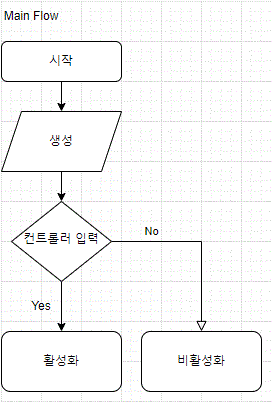
인벤토리 키고 끄기 Flow void Update() { check_input(); } void check_input() { if (Button.AButton) { if (inventory.activeSelf == false) inventory.SetActive(true); else inventory.SetActive(false); }​ 1. Update 메서드를 활용하여 Controller의 입력값의 변화를 감지하여 실행 2. Inventory의 현재 상태를 확인하여 활성화, 비활성화 아이템 넣기 Flow public InventoryObject inventory; public void OnTriggerEnter(Collider other) { var item = other.GetComponent();..