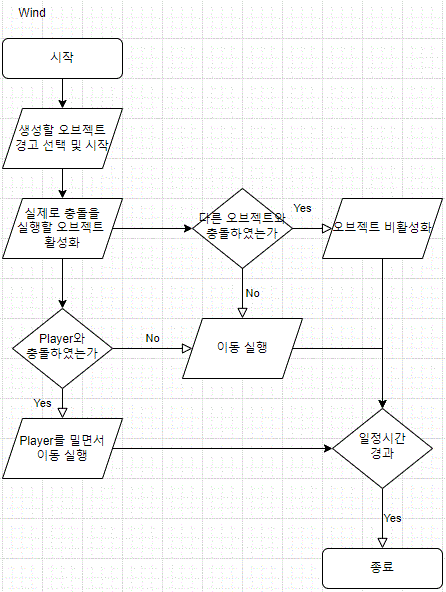
바람 오브젝트 선택
public class Select_wind : MonoBehaviour
{
    [Header("Wind Object(Add Collider)")]
    public GameObject[] winds; // 바람 영역이 저장된 변수
    public GameObject[] winds_warnning; // 위험 지역 표식이 저장된 변수
    // Start is called before the first frame update
    void OnEnable()
    {
        StartCoroutine(selecte());
    }
    void OnDisable()
    {
        foreach (GameObject o in winds) o.SetActive(false); // 모든 바람 비활성화
    }
    // 바람 선택
    IEnumerator selecte()
    {
        int active_wind = Random.Range(0, winds_warnning.Length-5); // 0 ~ winds-5 사이의 랜덤 변수 지정
        for (int i = 0; i <= active_wind; i++) // 활성화할 개수만큼 실행
        {
            int play_wind = Random.Range(0, winds_warnning.Length); // 활성화할 바람 영역 선택

            if (winds_warnning[play_wind].activeSelf == false) // 현 상태가 false일 경우
                winds_warnning[play_wind].SetActive(true); // true로 변환
            else
                i--; // 현 상태가 true일 경우 반복문 1회 재실행
        }
        yield return new WaitForSeconds(5.0f);
        for (int i = 0; i < winds.Length; i++) // 활성화할 개수만큼 실행
        {
            if (winds_warnning[i].activeSelf == true) // 현 상태가 true일 경우
                winds[i].SetActive(true); // true로 변환
        }
        yield return new WaitForSeconds(7.0f); // 7초간 대기
        foreach (GameObject o in winds) o.SetActive(false); // 모든 바람 비활성화
        foreach (GameObject o in winds_warnning) o.SetActive(false); // 모든 위험표시 비활성화
        StartCoroutine(selecte()); // 자신을 다시 호출
    }
}
1. 같은 위치의 바람과 바람 위험 표시 오브젝트를 순서대로 배치
2. 바람 위혐 표시를 먼저 선택 후 활성화
3. 5초 뒤 같은 순번의 배열에 저장된 바람 오브젝트 활성화(이동시작)
바람 위험 표시 실행
public class Wind_warnning : MonoBehaviour
{
    MeshRenderer wind_render;
    bool isIncrease;
    float speed = 1;

    private void Awake()
    {
        wind_render = GetComponent<MeshRenderer>();
    }
    void OnEnable()
    {
        Warnning_Enable(); //Blink 켜기
        isIncrease = true;
        Material m = wind_render.material; // Blink 기능을 할 메터리얼 값 연결
        m.color = new Color(m.color.r, m.color.g, m.color.b, 0f); // Color 초기값 설정
        //StartCoroutine(Disable_time());
    }

    public void Warnning_Enable()
    {
        wind_render.enabled = true; // 렌더를 켜서 Blink 실행
    }

    public void Warning_Disable()
    {
        wind_render.enabled = false; // 렌더를 켜서 Blink 끄기
        StartCoroutine(Dis_GameObject());
    }
    IEnumerator Dis_GameObject()
    {
        yield return new WaitForSeconds(1.0f);
        gameObject.SetActive(false);
    }
    IEnumerator Disable_time()
    {
        yield return new WaitForSeconds(5.0f);
        Warning_Disable();
    }
    void Update()
    {
        Material m = wind_render.material;

        if (isIncrease) // alpha 값이 증가중
        {
            // alpha 값이 0.04까지 speed 값만큼의 속도로 커짐
            m.color = Color.Lerp(m.color, new Color(m.color.r , m.color.g, m.color.b, 0.1f), Time.deltaTime * speed);
            // 만약 aplha값이 0.039보다 크다면 감소 시킴
            if (m.color.a > 0.099f) isIncrease = false;
        }
        else          // alpha 값이 감소중
        {
            // alpha 값이 0까지 speed 값만큼의 속도로 작아짐
            m.color = Color.Lerp(m.color, new Color(m.color.r, m.color.g, m.color.b, 0f), Time.deltaTime * speed);
            // 만약 aplha값이 0.004보다 작다면 증가 시킴
            if (m.color.a < 0.004f) isIncrease = true;
        }
    }
}
1. Mesh Renderer의 Material의 Alpha값을 수정하여 불투명도로 위험 지역을 표시한다.
바람 이동
public class Wind_move : MonoBehaviour
{
    private Rigidbody wind_rigidbody;
    public Vector3 destination;
    private float wind_speed = 0.03f;

    bool triggerStart = false;

    // Start is called before the first frame update
    void OnEnable() // 오브젝트 활성화시
    {
        wind_rigidbody = GetComponent<Rigidbody>(); // 현재 오브젝트의 Rigidbody
        gameObject.transform.rotation = Quaternion.Euler(new Vector3(0, 0, 0));
        destination = wind_rigidbody.transform.position; // 현재의 위치값을 destination에 저장
    }

    void OnDisable() // 오브젝트 비활성화시
    {
        wind_rigidbody.transform.position = destination; // 현재 오브젝트의 위치값을 초기 활성화 시의 위치 값으로 변경
    }
    // Update is called once per frame
    void Update()
    {
        wind_rigidbody.transform.position = wind_rigidbody.transform.position + new Vector3(-wind_speed,0,0); // X 축으로 이동

    }
}
1. 해당 오브젝트 활성화시 시작 위치값을 저장한 후 x축으로 이동(축은 오브젝트 세팅 방향에 따라 바뀜)
2. 오브젝트 종료시 초기 위치값으로 저장후 종료
다른 오브젝트와 충돌시 종료 방식
private void OnTriggerEnter(Collider other)
    {
        if (other.tag == "Wind")
            other.gameObject.SetActive(false);
    }
- 배치 되어있는 오브젝트의 적용 후 바람을 피할 수 있는 공간으로 활용
Player 충돌시 밀리기 실행 방식
public GameObject main_body;
    void wind_collider()
    {
        main_body.transform.position = new Vector3(main_body.transform.position.x-0.3f, main_body.transform.position.y, main_body.transform.position.z);
    }

    private void OnTriggerEnter(Collider other)
    {
        if (other.tag == "Wind")
            wind_collider();
    }
- Player 오브젝트의 할당 후 바람과 충돌시 X축 이동
* Rigidbody활용을 시도하였지만 일관적인 결과값이 나오지 않아 소스로 표현

비 오브젝트 선택
 [Header("Rain Object(Add Collider, Particle)")]
    public GameObject[] rains; // 비 영역이 저장된 변수
    public GameObject[] rains_warnning; // 위험 지역 표식이 저장된 변수

    void OnEnable()
    {
        StartCoroutine(selecte());
    }
    void OnDisable()
    {
        foreach (GameObject o in rains) o.SetActive(false); // 모든 바람 비활성화
    }
    // 바람 선택
    IEnumerator selecte()
    {
        int active_wind = Random.Range(0, rains_warnning.Length - 5); // 0 ~ winds-5 사이의 랜덤 변수 지정
        for (int i = 0; i <= active_wind; i++) // 활성화할 개수만큼 실행
        {
            int play_wind = Random.Range(0, rains_warnning.Length); // 활성화할 바람 영역 선택

            if (rains_warnning[play_wind].activeSelf == false) // 현 상태가 false일 경우
                rains_warnning[play_wind].SetActive(true); // true로 변환
            else
                i--; // 현 상태가 true일 경우 반복문 1회 재실행
        }
        yield return new WaitForSeconds(2.0f);
        for (int i = 0; i < rains.Length; i++) // 활성화할 개수만큼 실행
        {
            if (rains_warnning[i].activeSelf == true) // 현 상태가 true일 경우
                rains[i].SetActive(true); // true로 변환
        }
        yield return new WaitForSeconds(5.0f); // 5초간 대기
        foreach (GameObject o in rains) o.SetActive(false); // 모든 바람 비활성화
        foreach (GameObject o in rains_warnning) o.SetActive(false); // 모든 위험표시 비활성화
        StartCoroutine(selecte()); // 자신을 다시 호출
    }
1. 바람 선택과 동일한 방식으로 구동. 단, 실행 시간만 비의 특성에 맞게 변경
비 오브젝트 이동
 private Rigidbody rain_rigidbody;
    public Vector3 destination;
    private float rain_speed = 0.1f;

    // Start is called before the first frame update
    void OnEnable() // 오브젝트 활성화시
    {
        rain_rigidbody = GetComponent<Rigidbody>(); // 현재 오브젝트의 Rigidbody
        destination = rain_rigidbody.transform.position; // 현재의 위치값을 destination에 저장
    }

    void OnDisable() // 오브젝트 비활성화시
    {
        rain_rigidbody.transform.position = destination; // 현재 오브젝트의 위치값을 초기 활성화 시의 위치 값으로 변경
    }
    void Update()
    {
        rain_rigidbody.transform.position = rain_rigidbody.transform.position + new Vector3(0, -rain_speed, 0); // Y 축으로 이동
    }
}
1. Y축 방향으로 이동하여 떨어지는 효과 표현
비 내리기 위험구역 및 디버프
public class Rain_warnning : MonoBehaviour
{
    public SmoothLocomotion player;
    MeshRenderer rain_render;
    bool isIncrease;
    float speed = 1;
    float debuff_speed;
    float origin_speed;

    private void Awake()
    {
        rain_render = GetComponent<MeshRenderer>();
        origin_speed = player.MovementSpeed;
        debuff_speed = player.MovementSpeed / 2;
    }
    void OnEnable()
    {
        Warnning_Enable(); //Blink 켜기
        isIncrease = true;
        Material m = rain_render.material; // Blink 기능을 할 메터리얼 값 연결
        m.color = new Color(m.color.r, m.color.g, m.color.b, 0f); // Color 초기값 설정
    }

    private void OnDisable()
    {
        player.MovementSpeed = debuff_speed;
        Warning_Disable();
    }

    public void Warnning_Enable()
    {
        rain_render.enabled = true; // 렌더를 켜서 Blink 실행
    }

    public void Warning_Disable()
    {
        rain_render.enabled = false; // 렌더를 켜서 Blink 끄기
    }

    void Update()
    {
        Material m = rain_render.material;

        if (isIncrease) // alpha 값이 증가중
        {
            // alpha 값이 0.04까지 speed 값만큼의 속도로 커짐
            m.color = Color.Lerp(m.color, new Color(m.color.r, m.color.g, m.color.b, 0.1f), Time.deltaTime * speed);
            // 만약 aplha값이 0.039보다 크다면 감소 시킴
            if (m.color.a > 0.099f) isIncrease = false;
        }
        else          // alpha 값이 감소중
        {
            // alpha 값이 0까지 speed 값만큼의 속도로 작아짐
            m.color = Color.Lerp(m.color, new Color(m.color.r, m.color.g, m.color.b, 0f), Time.deltaTime * speed);
            // 만약 aplha값이 0.004보다 작다면 증가 시킴
            if (m.color.a < 0.004f) isIncrease = true;
        }
    }

    private void OnTriggerEnter(Collider other)
    {
        if(other.tag == "Player")
        {
            StartCoroutine(Rain_Debuff());
        }
    }

    IEnumerator Rain_Debuff()
    {
        player.MovementSpeed = debuff_speed;
        yield return new WaitForSeconds(3.0f);
        player.MovementSpeed = origin_speed;
    }
}
1. Alpha 값을 변경하여 위험구역 표시
2. Player 오브젝트 충돌시 디버프 효과로 Player의 이동속도 변경 및 오브젝트 종료 시 Or 충돌 종료후 3초 뒤 복구
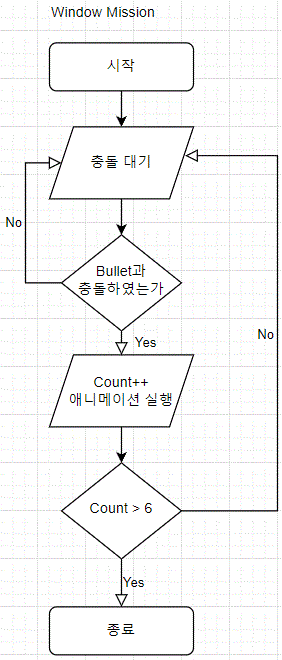
윈도우 미션 충돌 및 애니메이션
public class Close_motion_trigger : MonoBehaviour
{
    private Animator close_animation; // 애니메이션을 받아올 변수
    private int window_touch; // 충돌 횟수를 저장하기 위한 변수
    // Start is called before the first frame update
    void Start()
    {
        close_animation = GetComponent<Animator>();
        window_touch = 0;
    }

    private void OnTriggerEnter(Collider other)
    {
        print("충돌확인");
        if (other.tag == "Bullet")
        {
            print("총알 충돌확인");
            Destroy(other.gameObject);
            window_touch++;
            if (window_touch <= 6)
                Select_Animator();
            else
            {
                // 종료시 실행
            }
        }
    }
    void Select_Animator()
    {
        switch (window_touch)
        {
            case 1:
                close_animation.Play("Base Layer.Armature|Hit_01", 0, 0.25f);
                break;
            case 2:
                close_animation.Play("Base Layer.Armature|Hit_02", 0, 0.25f);
                break;
            case 3:
                close_animation.Play("Base Layer.Armature|Hit_03", 0, 0.25f);
                break;
            case 4:
                close_animation.Play("Base Layer.Armature|Hit_04", 0, 0.25f);
                break;
            case 5:
                close_animation.Play("Base Layer.Armature|Hit_05", 0, 0.25f);
                break;
            case 6:
                close_animation.Play("Base Layer.Armature|close_window", 0, 0.25f);
                break;
        }
    }
}
1. 총알이 창문 오브젝트에 충돌 시 애니메이션 실행
2. 충돌 횟수가 6이 넘어갈 경우 종료(마지막 애니메이션은 창문이 닫힘.)
'Project > Alice Project' 카테고리의 다른 글
| Cat Hunting (0) | 2022.02.13 |
|---|---|
| Spider Hunting (0) | 2022.02.13 |
| Inventory make (0) | 2022.02.13 |